Carlisle Connect - Trouble Shooting
Sign Up
Haven't logged into Carlisle Connect before?
If you have not previously registered with Carlisle Connect, you will need to ‘Sign Up’ with the email address connected to your building contract.
Having some trouble?
Follow our guide below to complete your sign-up for Carlisle Connect.
Steps to Sign Up:
- Head to carlisleconnect.com.au/sign-up
- Register as a new user with your email address by selecting Sign Up.
- You'll then recieve an email to verify your account. Once verified, you'll have full access.
If you have any questions or run into any issues, please don't hesitate to reach out.
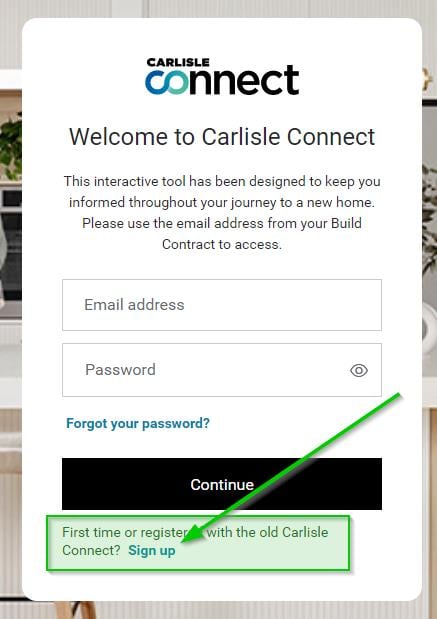
Forgot Your Password?
Can't remember your login details?
- Visit Carlisle Connect and click ‘Login’
- Click “Forgot your password?”
- Enter your email address (as per your building contract) and click “Continue”
- Check your email for the link “Change your password”
- Enter your new password
Frequently Asked Questions
I don’t want to use Authenticator app. Can I use SMS as a second factor instead?
Yes. You can select “SMS" when prompted.
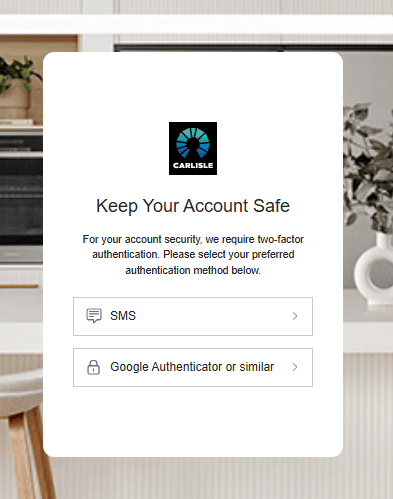
Note: We do recommend using an Authenticator app. Authenticator is more secure, and even if the mobile phone has no reception, Authenticator will still work.
Can I login with my social media platforms?
No, this is not enabled. Please use an Authenticator app, or SMS.
Can I use the same mobile phone to register across multiple Carlisle Connect accounts?
No, mobile can only be registered to one account.
Do I have to enter the one-time log in code every time I log in to Carlisle Connect?
Yes. This is for security reasons to prevent the chance of any cyber incident or identity theft.